Architecture at a glance
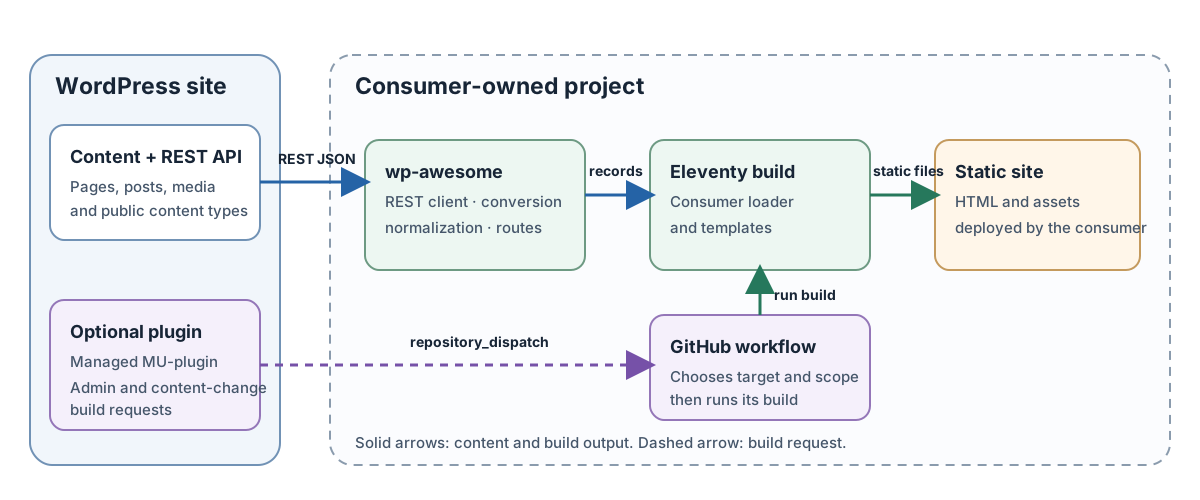
The wp-awesome JavaScript package runs inside the consuming project's build. The optional WordPress plugin and its managed MU-plugin send build requests to that project's GitHub workflow. WordPress remains the content source; the consumer chooses what to fetch and owns the Eleventy templates, build workflow, and hosting.
Content build sequence
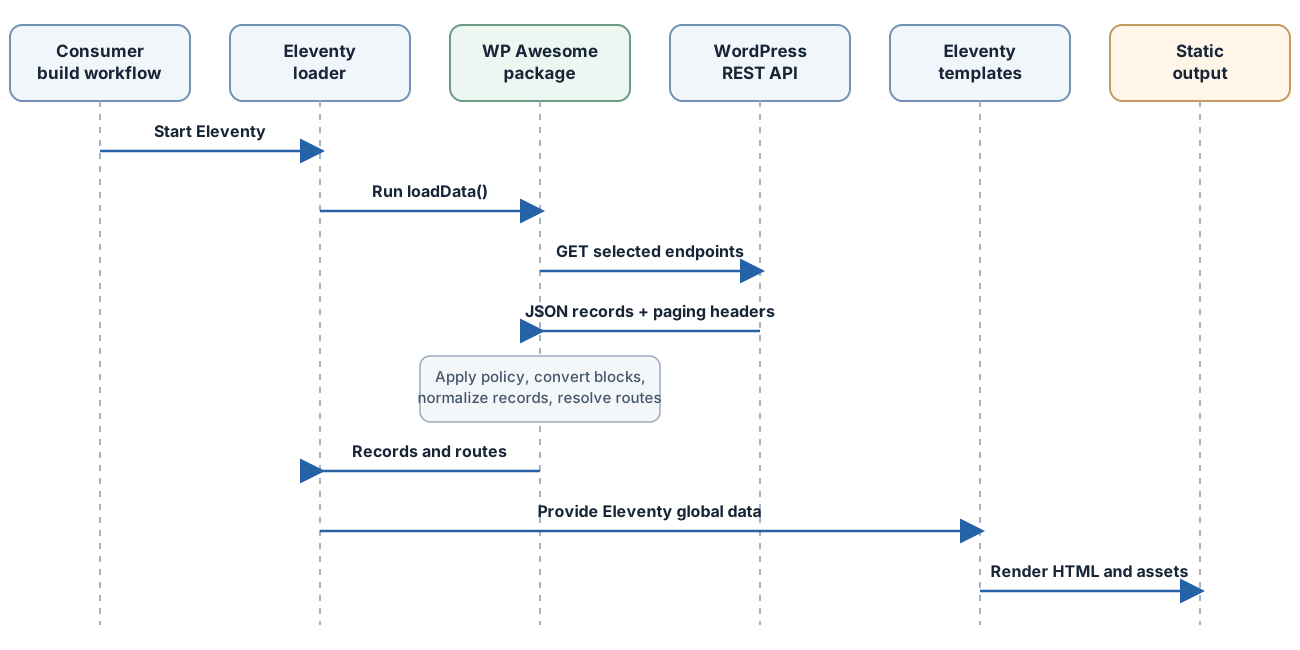
The consumer's Eleventy loader selects REST endpoints and policies. The package fetches and normalizes that data, then returns records and routes for Eleventy templates to render.
The package modules are intentionally separated: rest-client.js owns HTTP mechanics, content.js owns serialized Gutenberg interpretation, records.js owns public data shaping, routes.js owns URL contracts, and eleventy.js only registers a caller-provided data loader. wordpress-plugin/wp-awesome.php installs the managed MU-plugin; wordpress-plugin/wp-awesome-mu.php owns the admin controls, content-change hooks, and GitHub notification delivery. In a local checkout, inspect those files directly to see the implementation behind this guide.
1. The consumer owns discovery
The REST client does not enumerate every post type, taxonomy, plugin, or route on the WordPress site. A site-owned loader explicitly chooses endpoints such as wp/v2/pages, wp/v2/posts, custom REST routes, or WooCommerce's Store API, along with its query parameters.
For embedded author, taxonomy, and featured-media records, request _embed=1 when the selected endpoint supports it. The normalizer reads those embedded records; it does not issue extra requests to discover missing relationships. If a custom post type or taxonomy is not registered as REST-visible, this package cannot fetch it.
2. REST transport and request guards
createWordPressRestClient() accepts a REST root such as https://beautiful.wp.site/wp-json/ and exposes getJson() for one resource and getCollection() for paged collections. Endpoints must be relative to that root; absolute URLs and paths that leave its origin or prefix are rejected. Query values can be objects, arrays, or URLSearchParams.
For a collection, the client asks for at most 100 records per page, reads X-WP-TotalPages, requests the remaining pages in order, and refuses collections above maxPages (default 1000). It validates that each page is an array. If WordPress or a proxy omits X-WP-TotalPages, the client treats the response as one page; it cannot infer that more records exist.
Each request has a 20-second timeout by default. A caller-provided AbortSignal replaces that timeout signal, so the caller must include its own deadline when supplying one. The client makes three retries after the initial attempt for network failures, HTTP 429, and HTTP 5xx, with an exponential delay starting at 400 ms. A numeric or date-form Retry-After is honored up to 30 seconds. Other HTTP 4xx responses fail immediately. Requests for multiple collection pages are sequential, not parallel. Pass maxPages, perPage, retries, retryDelayMs, and timeoutMs deliberately for the size and rate limits of the source site.
The context defaults to view. The caller's getHeaders() callback can add credentials by request context. Edit-context requests over plain HTTP are rejected except on loopback. If an edit collection explicitly opts into allowPublicFallback, only 401 or 403 restarts the whole collection in public context; fallback is not enabled automatically and is not attempted for other status codes. See the REST API reference for signatures and installation guide for server-side Application Password setup.
3. Authentication stays with the caller
createApplicationPasswordHeaders() builds a Basic authorization header and removes the display spaces from the Application Password. It does not read .env, GitHub secrets, or WordPress configuration. The consumer chooses where secrets come from and should attach authorization only to requests that need it.
The REST client accepts static headers as well as getHeaders(). Static headers are sent on every request; use a context-aware callback when only edit-context requests should be authenticated. No credential should be embedded in baseUrl, a query string, a template, or the generated output.
4. Content conversion and Gutenberg
WordPress can return server-rendered content.rendered and, for an authorized edit-context request, serialized content.raw. The adapter uses the WordPress block-serialization parser to read Gutenberg comments and nested blocks. It records a sorted block-name count for coverage diagnostics, but block metadata is not added to the final public record.
The selected policy can be a default plus overrides by content type. Its mode determines which source is used:
| Mode | Behavior | Use it when |
|---|---|---|
rendered |
Prefer WordPress content.rendered, retaining that source's plugin-generated HTML |
WordPress's rendering and plugin markup should remain authoritative |
auto |
Use serialized markup only when it contains blocks and every block is allowed or has a custom renderer; otherwise prefer rendered HTML | You want coverage diagnostics and a graceful public fallback |
blocks |
Require serialized blocks and complete declared block coverage; throw when either condition is missing | A build must fail rather than silently accept incomplete block coverage |
By default, freeform HTML outside a named block is not considered covered in blocks mode. supportedBlockNames is an explicit allowlist; it does not verify that the resulting markup looks like the original WordPress theme. A blockRenderers callback can synchronously replace a block's reconstructed inner HTML and must return a string. Dynamic blocks often need WordPress-rendered output or a purpose-built renderer because their saved content may not contain their server-generated view.
In auto mode, the normalized record exposes source, blockTypes, unsupportedBlockNames, and fallbackReason. Log those values during integration testing so an unnoticed fallback does not become a permanent content policy. For a step-by-step configuration, see Gutenberg content.
5. The normalized record applies an HTML allowlist
normalizeWordPressRecord() keeps common fields: ID, type, slug, status, dates, title and excerpt HTML/text, selected content HTML and diagnostics, author, embedded terms, featured media, source URL, route, and explicitly approved custom fields. content.raw and arbitrary source metadata do not pass through. Custom fields are copied only when their keys are listed in customFields; if WordPress returns an acf object, it is preferred as the source, otherwise meta is used.
Author email and login values are excluded. The author adapter supports WordPress's single author relation, not co-author plugins. Embedded taxonomy terms are normalized; missing relations remain missing. The featured-media adapter uses the first embedded featured-media record and keeps its ID, source URL, alt text, and rendered caption.
The package keeps selected HTML because templates often need markup, and sanitizes title.html, excerpt.html, content.html, captions, author descriptions, taxonomy descriptions, and custom renderer output with a strict allowlist. The default policy drops executable and active-content elements, event attributes, unsafe URL schemes, and CSS properties or values outside its safe set. sanitizerOptions may add explicitly named Web Awesome tags and attributes, CSS variables or fonts, and raster background images under an exact WordPress uploads prefix; these are trusted consumer settings and should stay narrow. Custom fields are selected data and are not HTML-sanitized. Validate their types, use ordinary template escaping, and sanitize them separately if a consumer deliberately renders them as markup.
6. Routes and collisions
resolveWordPressRoute() applies a route for the record type or a default route. String templates support {slug} and :slug placeholders, including dot paths such as {date.year}. Placeholder values are URL-encoded. The normalized result contains a trailing-slash path, an Eleventy outputPath such as articles/example/index.html, and a canonical URL based on the consumer's siteUrl.
The resolver rejects empty paths, query strings, fragments, invalid encoding, and path traversal. The caller can inject its own route resolver, override a canonical URL, or customize the output-path function. assertNoWordPressRouteCollisions() detects duplicate WordPress output paths when the consumer calls it.
Collision checks are not automatic. The consuming site must run them after it has loaded all route-producing records, and it must also compare those records with static pages or other templates that write output files. The package does not create redirects for changed slugs and does not remove stale files left by an old route.
7. What the Eleventy plugin actually does
createWordPressEleventyPlugin({ loadData, key }) registers the supplied function with Eleventy's addGlobalData(). The default key is wordpress. The data loader can fetch and normalize content once for the build; templates then read that global data. The plugin does not choose endpoints, create template files, generate archive pages, configure Eleventy's output directory, run route checks, or deploy the result. See the complete example for a small consumer-owned loader and templates.
Optional adapters
The integrations are opt-in helpers, not mandatory dependencies on those WordPress plugins:
- WooCommerce Store API: fetches public product and category collections through the configured REST client. It does not provide cart, checkout, stock reservation, accounts, orders, payment processing, or a private customer session.
- Yoast-compatible sitemap: requests only the sitemap names the consumer lists and extracts
<loc>values fromurlsetorsitemapindexXML. The consumer suppliesfetchText; the optionalcreateRetryingFetchText()helper provides bounded retries for transient transport and server failures. The adapter does not discover sitemap names, filter URLs against routes, or decide which sitemap names to request. - Forminator and MailPoet: consumers may supply form detectors to
collectFormReferences()for an inventory of form IDs and source records. WP Awesome does not render, embed, submit, or validate plugin forms. Detectors that rely on customdata-*attributes must explicitly allow those attributes through the HTML sanitizer.
WP Awesome has only been tried with simple, single-language sites. Multilingual sites have not been tested, and the package has no built-in WPML or Polylang adapter.
- Forms: runs caller-supplied markup detectors and deduplicates provider/ID references. It does not render, submit, validate, or store form responses.
Known limits and design choices
| Concern | Current behavior | What the consuming site must do |
|---|---|---|
| Endpoint discovery | None; endpoints are explicit | Inventory public content types, taxonomies, plugins, and routes |
| Record visibility | Follows the REST endpoint and request context; normalization retains status |
Fetch only publishable content and explicitly decide how to treat drafts, password-protected posts, and private types |
| Large or changing collections | Sequential pagination, maximum 100 per page and 1000 pages by default; pages are not read from a transactional snapshot | Narrow queries or raise bounds carefully; account for API limits, and expect a record edited during pagination to shift between pages |
| Caching | No disk cache, persistent cache, ETag store, or offline fixture layer | Add a consumer-owned cache if repeated REST calls are too costly or a build must work offline |
| Dynamic rendering | Reconstructs saved block inner markup and runs synchronous custom block renderers | Use WordPress-rendered content or implement and test missing dynamic block output |
| Theme presentation | No WordPress CSS, JavaScript, fonts, shortcodes, or plugin asset bundles are copied | Recreate required presentation in the Eleventy site and test parity |
| Multilingual/plugin data | No built-in WPML, Polylang, co-author, or arbitrary plugin schema adapter | Use that plugin's documented REST endpoint and add a site-owned normalization/integration layer |
| Route lifecycle | Resolves current routes and can assert duplicate output paths | Add redirects and remove or replace stale output when a route changes or content is deleted |
| Sanitization | Applies a strict HTML allowlist; custom fields remain untrusted data | Validate custom-field schemas, template escaping, and any trusted extensions to the allowlist |
| Runtime features | Build-time content only | Keep cart, checkout, accounts, personalized data, and form submissions on an appropriate runtime service |
| Operations | WP Awesome sends immediate GitHub notifications but does not build or deploy a consumer site or retry rejected automatic events | Read client_payload.scope and record fields in the consumer workflow, then add target-specific quality jobs, approvals, versioned promotion, rollback, and web-server routing from publishing and hosting |
The JavaScript tests use local mock responses to verify pagination, retry/fallback, Gutenberg policy, normalization, security, and routes. A PHP harness checks MU-plugin installation and cleanup, build actions, content-list columns, and automatic per-record dispatch without WordPress or GitHub credentials. It does not prove that a particular WordPress installation exposes the expected REST fields, that a consumer workflow builds only one route, that a plugin's blocks render correctly, or that a production deployment is available. Test those boundaries against a staging WordPress site and the actual target host.